# Administration

The Administration space is your control center for configuring and managing your We360.ai instance. It covers organizational setup, subscription management, and advanced platform governance.

{% hint style="info" %}
Most settings here require **Super Admin** or **Admin** role access.
{% endhint %}

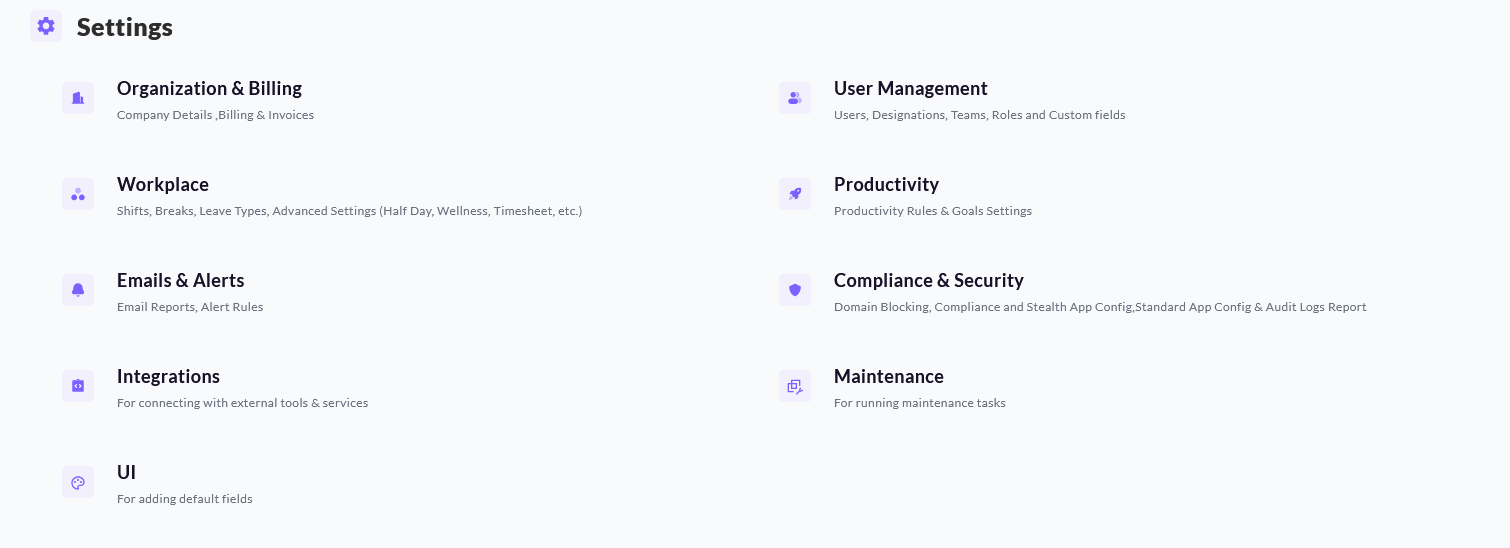
<figure><img src="/files/nIfF7naEXCSflX49l9Iz" alt=""><figcaption></figcaption></figure>

<table data-view="cards"><thead><tr><th>Section</th><th>Summary</th><th data-hidden data-card-target data-type="content-ref"></th></tr></thead><tbody><tr><td><strong>Organization &#x26; Billing</strong></td><td>Manage your company profile, subscription, invoices, and branding.</td><td><a href="/pages/HkcZmg1KpPbeYcY0M1DK">/pages/HkcZmg1KpPbeYcY0M1DK</a></td></tr><tr><td><strong>User Management</strong></td><td>Invite employees, assign roles, and organize teams.</td><td><a href="/pages/FjzW1mR9hBNhiG1qdq1k">/pages/FjzW1mR9hBNhiG1qdq1k</a></td></tr><tr><td><strong>Workplace</strong></td><td>Configure attendance, shifts, and time-off rules.</td><td><a href="/pages/z5g2EinEm6U0SiF5cysH">/pages/z5g2EinEm6U0SiF5cysH</a></td></tr><tr><td><strong>Productivity</strong></td><td>Define productivity settings, classifications, and thresholds.</td><td><a href="/pages/H9yNB4uMuSrJNJSY0482">/pages/H9yNB4uMuSrJNJSY0482</a></td></tr><tr><td><strong>Emails &#x26; Alerts</strong></td><td>Manage notification rules, scheduled reports, and alert triggers.</td><td><a href="/pages/orNMscoNrB9OHh2vjubd">/pages/orNMscoNrB9OHh2vjubd</a></td></tr><tr><td><strong>Compliance &#x26; Security</strong></td><td>Control audit, tracking, blocking, and related safeguards.</td><td><a href="/pages/pzGWZuRrpSnubrM4wJqc">/pages/pzGWZuRrpSnubrM4wJqc</a></td></tr><tr><td><strong>Integrations</strong></td><td>Manage API keys, webhooks, and connected services.</td><td><a href="/pages/dAwNDFXdZFWcIpRt1TaC">/pages/dAwNDFXdZFWcIpRt1TaC</a></td></tr><tr><td><strong>Maintenance</strong></td><td>Run maintenance tasks</td><td></td></tr><tr><td><strong>UI</strong></td><td>Change default fields displayed</td><td></td></tr></tbody></table>

{% hint style="info" %}
Detailed setup guides for each section are being added.
{% endhint %}


---

# Agent Instructions: Querying This Documentation

If you need additional information that is not directly available in this page, you can query the documentation dynamically by asking a question.

Perform an HTTP GET request on the current page URL with the `ask` query parameter:

```
GET https://docs.we360.ai/administration/readme.md?ask=<question>
```

The question should be specific, self-contained, and written in natural language.
The response will contain a direct answer to the question and relevant excerpts and sources from the documentation.

Use this mechanism when the answer is not explicitly present in the current page, you need clarification or additional context, or you want to retrieve related documentation sections.